

The launch of Google two new AI assistant tools for advertisersin “Ads Advisor” and “Analytics Advisor,” both of which use Google’s Gemini AI models to guide you in maximizing your Google promotions and website performance.
First, on Ads Advisor. Google says its Ads Advisor will act as an AI partner that aims to help you proactively manage campaigns directly within Google Ads.
According to Googling:
“[Ads Advisor] helps you understand your business context and make your job easier by learning directly from your interactions to improve campaign results.”
For example, when you run a Performance Max campaign, Ads Advisor provides personalized recommendations to help you achieve your goals.
“Simply ask a question like, ‘How can I optimize my campaign for an upcoming seasonal event?’ and relevant actions will be suggested, such as adding sitelink extensions. With your review and approval, it can then apply these changes directly to your account, turning suggestions into applied improvements in minutes.”
The system is trained on Google Ads performance data to understand the key elements that drive performance. This should mean that these recommendations provide valuable guidance on what will help you improve the performance of your campaign.
Because AI, as we currently identify it anyway, is pattern matching, on a broad scale, and as such AI systems need to be able to recognize behavioral and performance patterns that can deliver better results, based on past ad campaigns.
So ask the right questions and you should be able to drill down into the key data elements that will help improve performance.
Ads Advisor can also provide creative guidance, including Keyword recommendations for your Search Network and Performance Max campaigns, based on your website context, current keywords, and existing assets.
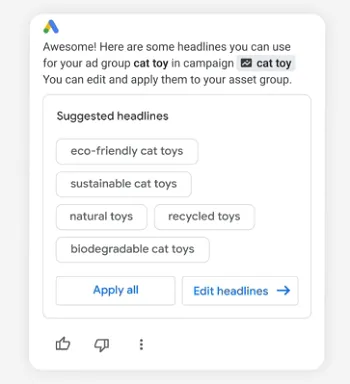
And since this is backed by Google data, this can be very valuable as it provides direct guidance on the most relevant keywords for your products, which could yield higher listings in SERPs.
The second new element, Analytics Advisor, is intended to guide you through your performance data and highlight optimization opportunities where possible.
“Analytics Advisor solves the challenge of getting a holistic view of your data by providing immediate, easy-to-understand performance insights and visualizations that accelerate analysis. You can ask a broad question, such as “How is my site doing?”, and relevant reports will be derived from it to give you a customized, comprehensive pulse of your business’s health. You can also ask a specific question, such as “What have my active users done in the last 30 days?”, to generate instant insights on key metrics and events. It even retrieves specific details like your measurement ID.”
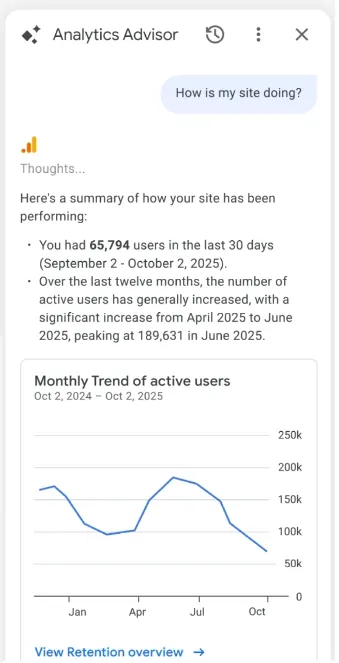
Simplified analytics insights that help you find more relevant data notes without having to do any digging yourself.
So now if you’re looking for answers about things like why your traffic increased or decreased, or which pages are the most popular, you can just ask the chatbot and it will give you instant insight, instead of scrolling through data tables.
Of course, you’ll want to double-check and validate answers wherever possible alongside this AI-powered guidance, in case of errors in processing, while also knowing the right questions to ask to avoid mix-ups of correlations and causalities, etc.
But these should be valuable guidance for your assessment process, which could make it much easier to find opportunities within your Google data elements.
Anyway, some interesting additions, which could ultimately be valuable tools.
Google says that both Ads Advisor and Analytics Advisor are rolling out to all Google Ads and Google Analytics English-language accounts, and will be available globally in early December.
#Google #adds #AIpowered #guidance #advertising #analytics