

iOS and Android’s different design languages, different versions of native components, and Buffer’s own design language can sometimes make mobile apps feel fragmented. Designers and developers end up speaking different languages, duplicating work, and delivering experiences that feel inconsistent across platforms.
At Buffer we really felt this friction. Our mobile design workflow wasn’t as efficient as it could have been. We spent too much time reinventing the wheel, manually merging screenshots and catching up with our web app counterpart. We knew we needed a better way.
So we built one.
Meet 🍿Popcorn To Go
Buffer’s new mobile design system for iOS and Android. It’s our answer to the chaos, and it just passed its first big test: helping us deliver our iOS app with Apple’s new Liquid Glass design language when iOS 26 launched in September 2025.
Let’s dive in. 🍿
Why we built it
Before Popcorn To Go, our mobile development process had some painful friction points:
- Miscommunication between design and engineering. Without a shared design language, the transfer was slow and error-prone. Our iOS app ended up with over 300 colors, most of which were slightly different shades of the same color. There was no source of truth.
- Design decisions are made on the spot. With no source of truth, engineers had to improvise and make design decisions on the fly to make things work.
- Inconsistent and inaccessible user interface. Small differences emerged between platforms, and even between different screens on the same platform. Our apps didn’t feel as polished as they could be, and we weren’t taking full advantage of the accessibility features built into the native components.
- Dated look and feel. As all these things piled up, it became more difficult to adopt the latest native components or make changes to the overall look and feel of Buffer.
These problems started to hold us back. Our vision for Popcorn To Go was simple: create a system that delivers efficiency, consistency, accessibility and future-proofing, without sacrificing the uniqueness and benefits that native components bring to a small mobile team like ours.
The objectives of Popcorn To Go
We started with four clear goals:
- Efficiency for engineering and design teams through standardized components and smart use of native platform components.
- Uniform design language This reduces miscommunication and speeds up iteration.
- Accessibility baked in by adopting best practices from iOS and Android’s native components.
- Readiness for platform evolutionlike Liquid Glass in iOS 26, so we can act quickly when the platforms do.
How it works
At its core, Popcorn To Go is based on two key concepts: tokens And component kits.
Tokens are the design decisions that shape your visual language – things like colors, spacing, typography and border radii. Think of them as the ingredients in a recipe. Instead of hard coding “use brand green #8FC67D”, we define a token like fill-brand that automatically adjusts in light mode, dark mode and different platforms. This means less chance of the wrong color being applied at any time.
Component sets are pre-built UI building blocks (buttons, cards, navigation bars) that use these tokens. They live in Figma for designers and are implemented in code for engineers, creating a shared source of truth.
The tricky part? Balancing platform specificity of consistency across platforms.
iOS and Android have their own design languages: Apple’s Human interface guidelines and Google’s Material design. We didn’t want to flatten everything into a generic, lowest-common-denominator experience. Instead, Popcorn To Go respects each platform’s own patterns while maintaining a cohesive buffer feel.
This approach has a bonus: we can use off-the-shelf components that have been tested by the native platforms for accessibility and cross-device compatibility – a huge asset for a two-person mobile engineering team.
This is how we structured it in Figma:
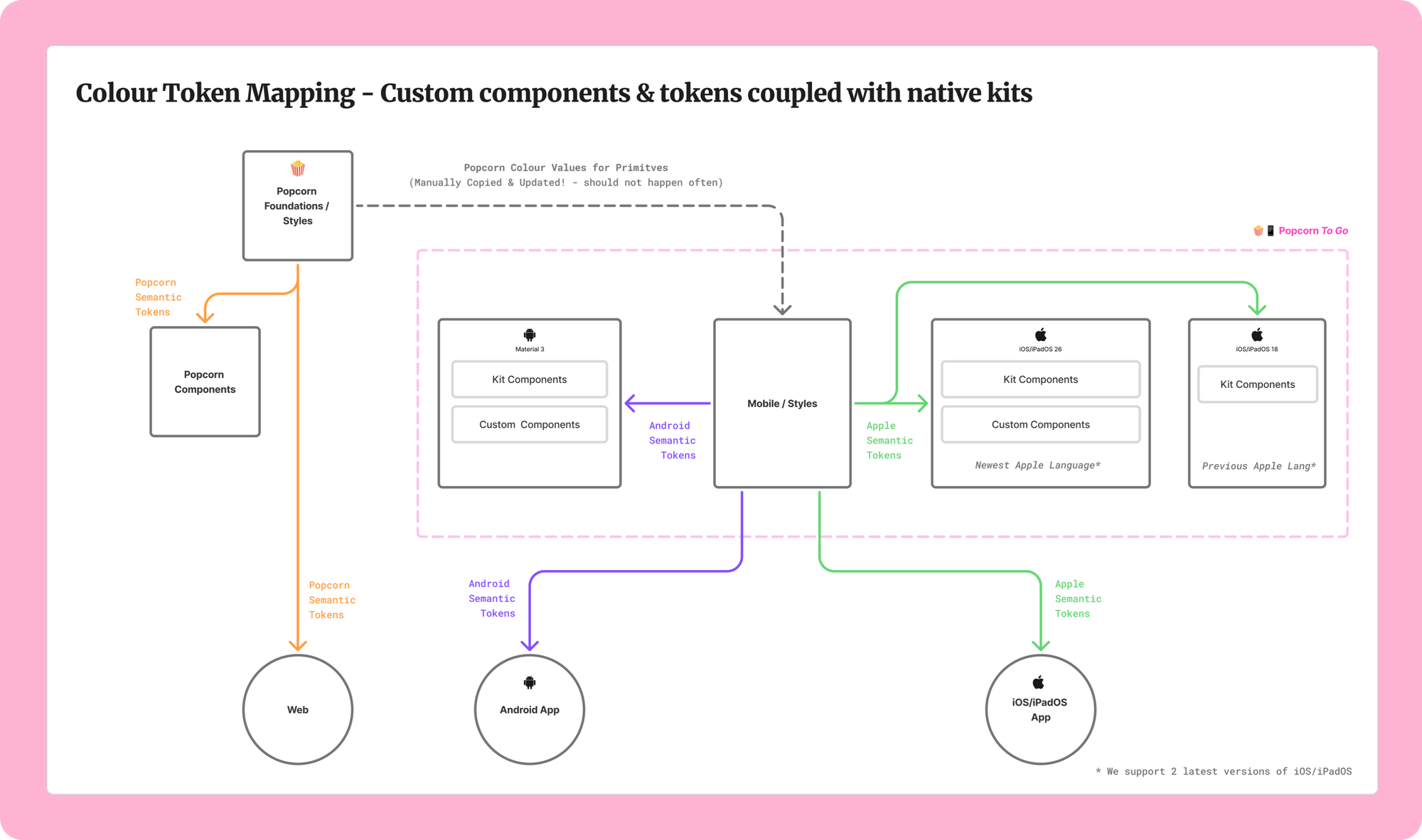
Token relationships between Figma files on the web and mobile design systems
- Mobile/Styles: Our base layer with primitive colors and platform-specific tokens. We used Material 3 naming for Android and custom naming for Apple. The primitive colors reflect those in our web app.
- Mobile/Android M3: Components built with Google’s Material 3 Expressive language, fully linked to our Android tokens.
- Mobile/iOS & iPadOS 26: Native iOS 26 components using Apple’s Liquid Glass design language, linked to our Apple tokens.
- Mobile/iOS & iPadOS 18: A lighter kit for the previous iOS version (since we support one version back).
- Mobile/Custom Components: Buffer-specific components that are not native to either platform.
Design operational challenges we solved
To get this system running smoothly, we had to tackle some tough design challenges:
- Figma link: The biggest challenge we faced was linking primitives. In an ideal world, the primitive colors would come directly from our main design system, Popcorn, and Popcorn To Go would simply map them to Android or Apple specific tokens. However, Figma’s current feature set does not support this. We had to create a new primitives file for Popcorn To Go that manually reflects the web’s primitives.
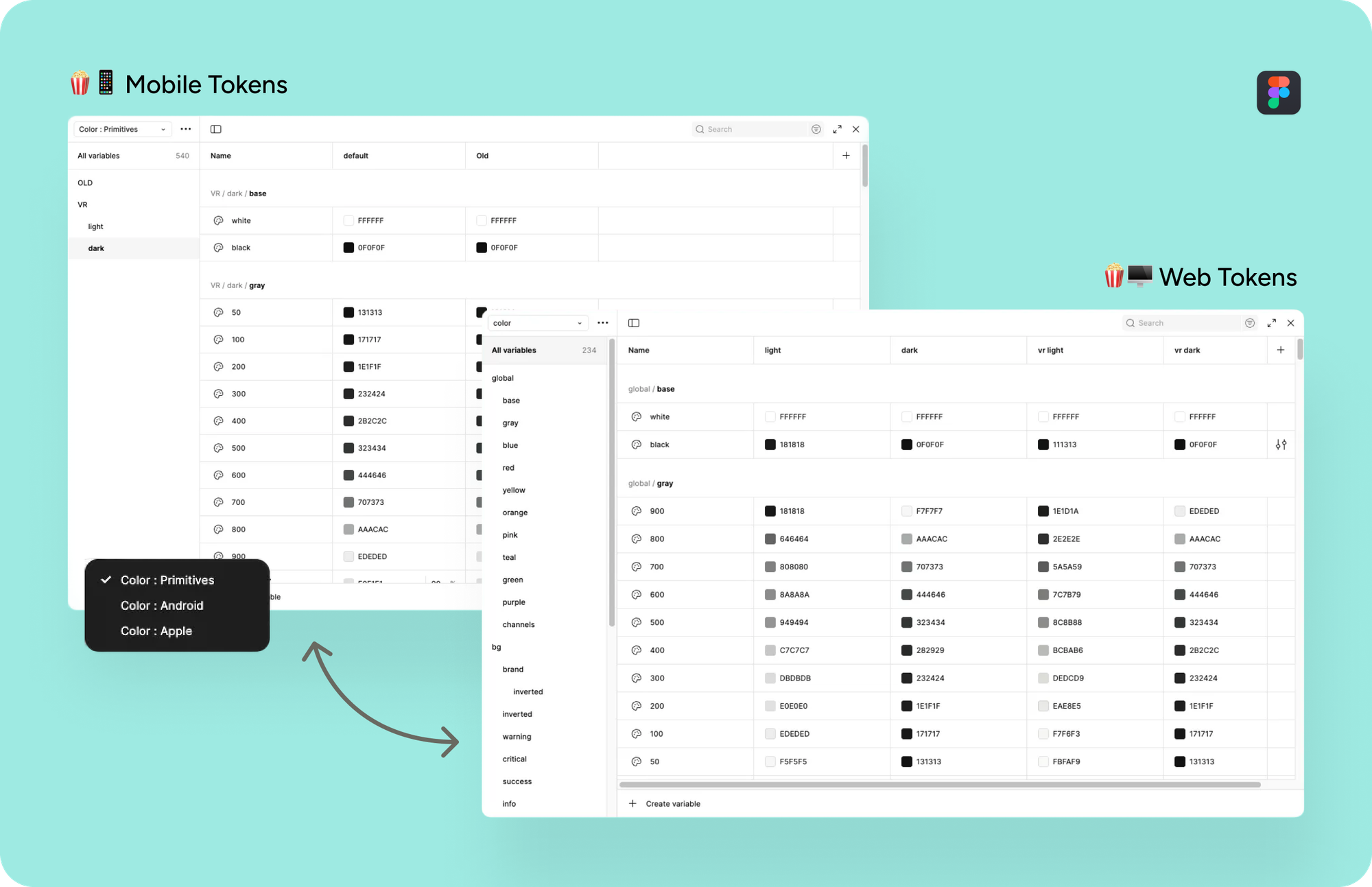
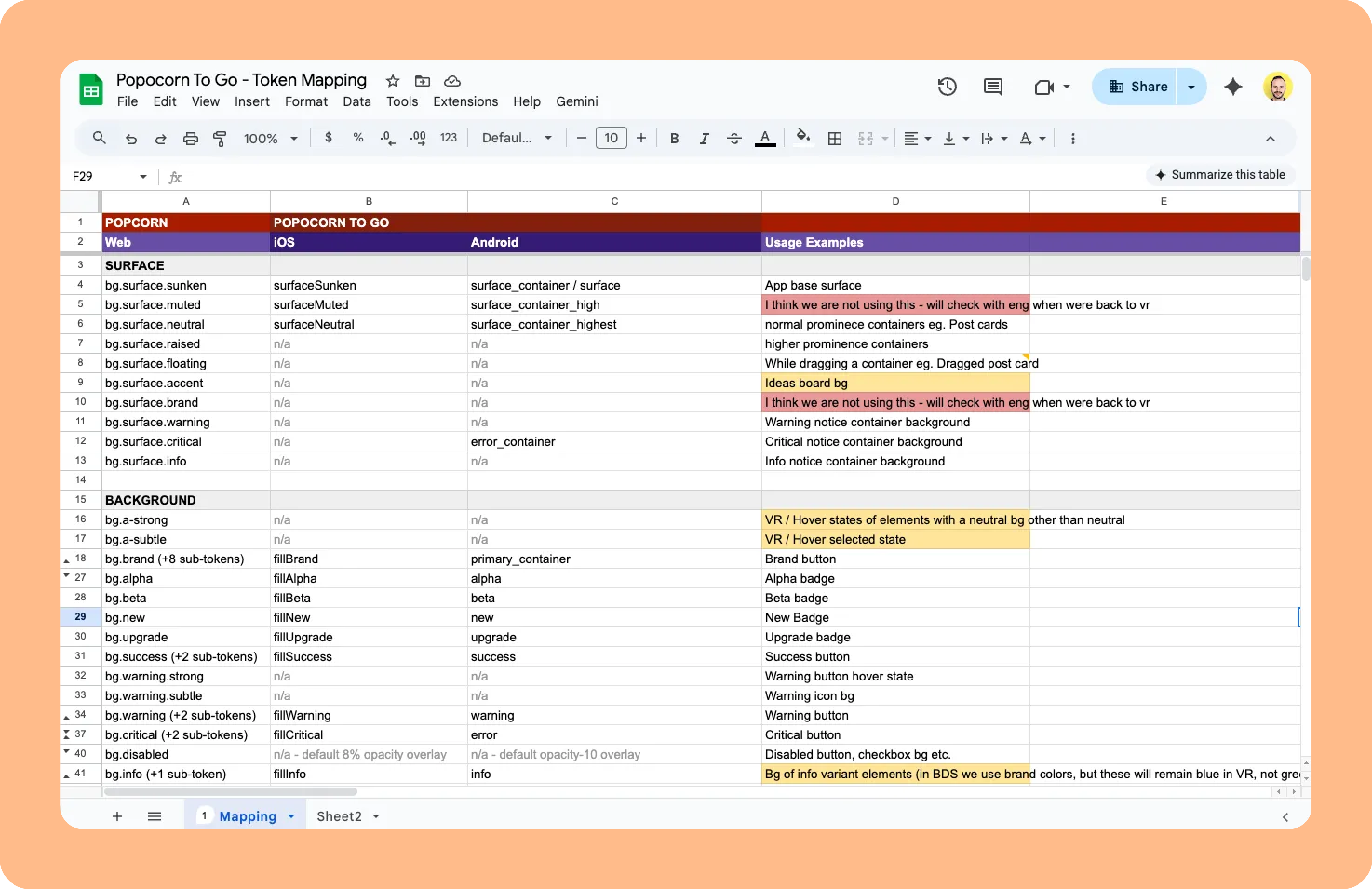
- Token naming: Creating a naming system for web, iOS, and Android that is somewhat streamlined while respecting platform-specific conventions.
- Kit styling: Apply our tokens to platform-specific kits while maintaining flexibility for future updates. This required several useful plugins, such as Figma Tokens and Variables Importer.
Frankly, it’s not the perfect, smoothly connected, buzzing system that every designer dreams of when setting up a design system.
Apple’s component kits in particular are complex and sometimes inconsistent, while Android’s token naming is very specific and tricky in its own way. But we ended up with pragmatic solutions that work for everyday use and achieve the goals we set out to achieve.
Strategic Timing: The iOS 26 Test
We launched Popcorn To Go with deliberate timing. iOS 26 was upon us and brought Apple’s new Liquid Glass design language: a fresh, modern aesthetic with frosted glass effects, refined animations, and a refined visual polish.
By building Popcorn To Go for iOS 26 launched, we positioned ourselves to:
- Be ready from day one when iOS 26 dropped
- Take advantage of the latest platform options immediately
- Send the visual refresh of our app alongside Apple’s new design language for maximum impact.
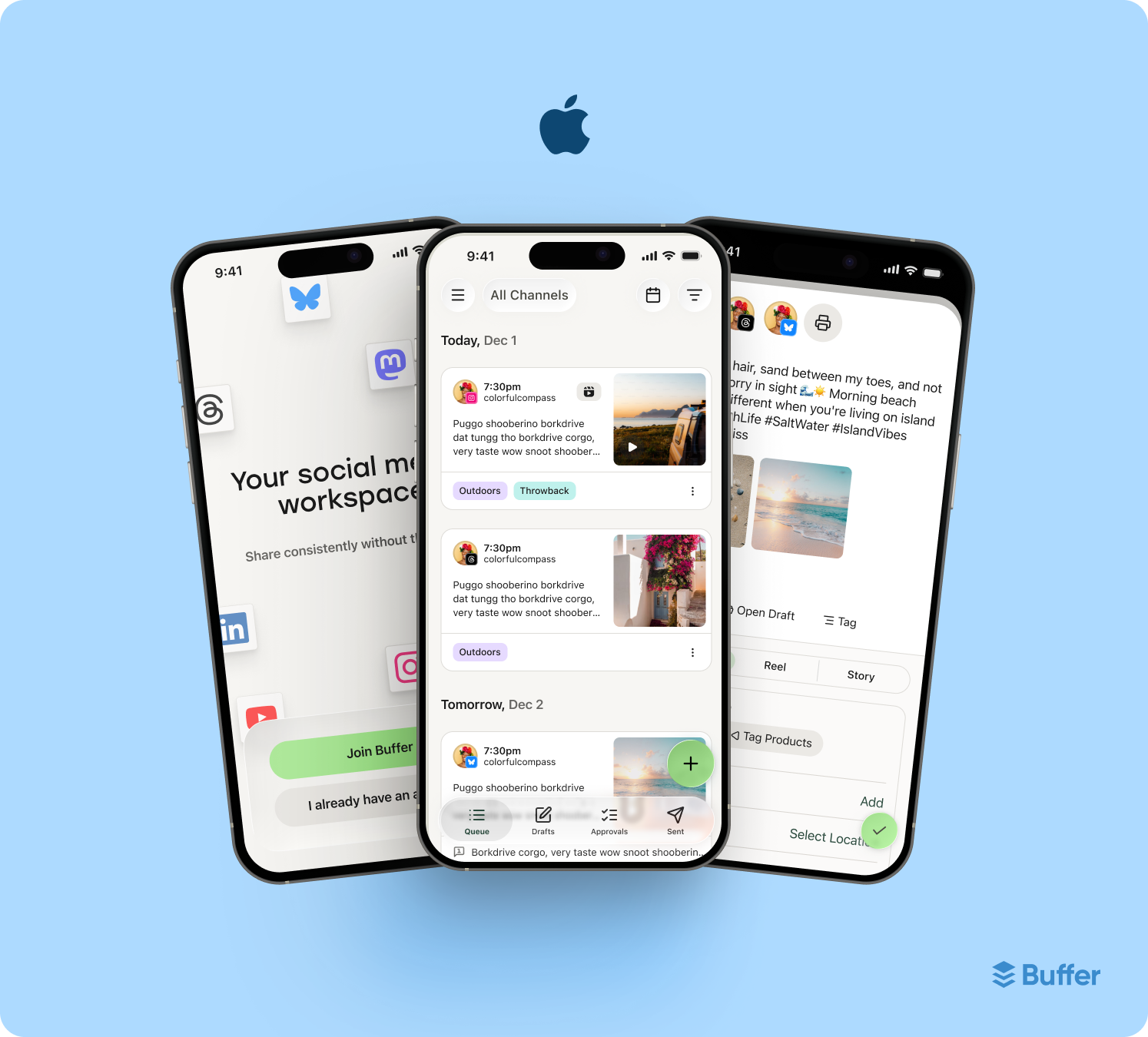
And it worked. When iOS 26 launched in September, we were ready. Our updated iOS app comes with both Liquid Glass And Buffer’s updated brand aesthetic, which delivers a polished, modern experience that is native to the platform while still remaining distinctly Buffer.
What’s next
Popcorn To Go is live and working, but we’re just getting started. This is what it says on the road map:
Short term:
- Apply to Android and refine based on feedback on both platforms.
- Expanding token coverage beyond colors (distance scales, edge radii, typography scales).
- Improving discoverability with better documentation.
Medium term:
- Expanding our custom component library with buffer-specific patterns.
- Drawing up detailed usage guidelines for the system.
- Evolving with platform updates as iOS and Android continue to iterate.
Long term:
- Keeping pace with the evolution of the platform (iOS 27 and later, material design updates, etc.).
- We are exploring the possibilities of bringing the insights learned back to our web design system, Popcorn.
Why it matters
For our designers and engineersPopcorn To Go means smoother collaboration, faster prototyping and less time spent on repetitive work. Instead of being stuck on which color to use where, teams can focus on solving more complex problems and creating better experiences.
For Buffering usersthis means more polished, consistent and accessible apps. When design systems work well, users may not consciously notice it, but they do feeling It. Interactions are smoother, the user interface is more predictable, and everything just works better.
Raising the bar
Building Popcorn To Go wasn’t just about solving today’s problems, it was also about preparing ourselves for the future.
Mobile platforms are constantly evolving. Design trends change. User expectations are rising. By investing in a solid foundation now, we’ll make it easier to keep pace, ship faster, and maintain quality as we grow.
This project was a true team effort: designers, iOS engineers, Android engineers, and product leads all worked together to make it happen. It’s the kind of work that isn’t always in the spotlight, but it makes everything else we build possible.
We are proud of what we have created and we look forward to building on it. If you want to see Popcorn To Go in action, download our iOS app and check out the new Liquid Glass experience.
Not on an Apple device? Stay tuned, Popcorn To Go is coming to Android soon!
Here’s to smoother collaboration, better apps and more consistency in the chaos. 🍿
#Popcorn #mobile #design #system #iOS #Android