

User experience is based on small, well -considered details that fit well into the overall design without overwhelming the user. This balance can be difficult, especially with technologies such as WebGL. Although they can make amazing visuals, they can also become too complicated and distracting if they are treated carefully.
A subtle but effective technique is the Bayer Dithering pattern. For example the recent JetBrains June campaign Page uses this approach to make a compelling and fascinating atmosphere that remains visually balanced and accessible.
In this self -study I will introduce you to Bayer’s Ditthering pattern. I will explain what it is, how it works and how you can apply it to your own web projects to improve the visual depth without overwhelming the user experience.
Bayer Dithering
The Bayer pattern is a kind of ordered ditthing, with which you can simulate gradients and depth with the help of a fixed matrix.
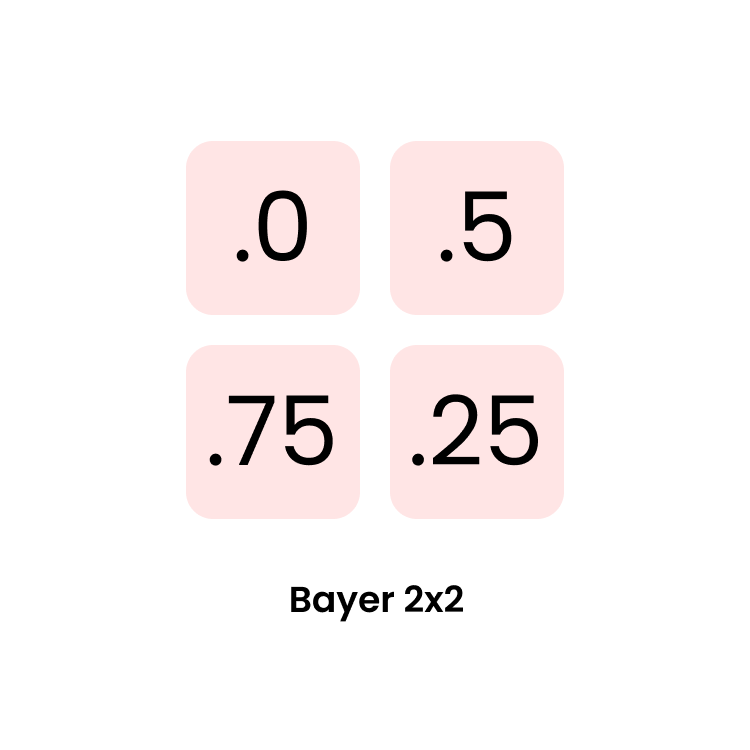
If we scale this matrix in the right way, we can focus specific values and make basic patterns.
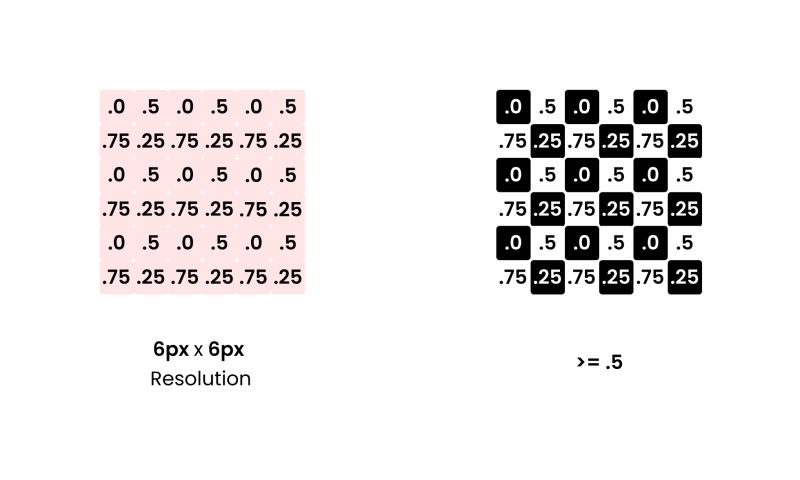
Here is a simple example:
// 2 × 2 Bayer matrix pattern: returns a value [0, 1)
float Bayer2(vec2 a)
{
    a = floor(a);                // Use integer cell coordinates
    return fract(a.x / 2.0 + a.y * a.y * 0.75);
    // Equivalent lookup table:
    // (0,0) → 0.0,  (1,0) → 0.5
    // (0,1) → 0.75, (1,1) → 0.25
}
Let’s walk through an example of how this can be used:
// 1. Base mask: left half is a black-to-white gradient
float mask = uv.y;

// 2. Right half: apply ordered dithering
if (uv.x > 0.5) {
    float dither = Bayer2(fragCoord);
    mask += dither - 0.5;
    mask  = step(0.5, mask); // binary threshold
}

// 3. Output the result
fragColor = vec4(vec3(mask), 1.0);
So with just a small matrix, we get four distinct dithering values—essentially for free.
See the Pen
Bayer2x2 by zavalit (@zavalit)
on CodePen.
Creating a Background Effect
This is still pretty basic—nothing too exciting UX-wise yet. Let’s take it further by creating a grid on our UV map. We’ll define the size of a “pixel” and the size of the matrix that determines whether each “pixel” is on or off using Bayer ordering.
const float PIXEL_SIZE = 10.0; // Size of each pixel in the Bayer matrix
const float CELL_PIXEL_SIZE = 5.0 * PIXEL_SIZE; // 5x5 matrix


float aspectRatio = uResolution.x / uResolution.y;

vec2 pixelId = floor(fragCoord / PIXEL_SIZE);
vec2 cellId = floor(fragCoord / CELL_PIXEL_SIZE);
vec2 cellCoord = cellId * CELL_PIXEL_SIZE;

vec2 uv = cellCoord/uResolution * vec2(aspectRatio, 1.0);

vec3 baseColor = vec3(uv, 0.0);
You’ll see a rendered UV grid with blue dots for pixels and white (and subsequent blocks of the same size) for the Bayer matrix.
See the Pen
Pixel & Cell UV by zavalit (@zavalit)
on CodePen.
Recursive Bayer Matrices
Bayer’s genius was a recursively generated mask that keeps noise high-frequency and code low-complexity. So now let’s try it out, and apply also larger dithering matrix:
float Bayer2(vec2 a) { a = floor(a); return fract(a.x / 2. + a.y * a.y * .75); }
#define Bayer4(a)   (Bayer2(0.5 * (a)) * 0.25 + Bayer2(a))
#define Bayer8(a)   (Bayer4(0.5 * (a)) * 0.25 + Bayer2(a))
#define Bayer16(a)   (Bayer8(0.5 * (a)) * 0.25 + Bayer2(a))

...
  if(uv.x > .2) dither = Bayer2 (pixelId);
  if(uv.x > .4) dither = Bayer4 (pixelId);
  if(uv.x > .6) dither = Bayer8 (pixelId);
  if(uv.x > .8) dither = Bayer16(pixelId);
...
This gives us a nice visual transition from a basic UV grid to Bayer matrices of increasing complexity (2×2, 4×4, 8×8, 16×16).
See the Pen
Bayer Ranges Animation by zavalit (@zavalit)
on CodePen.
As you see, the 8×8 and 16×16 patterns are quite similar—beyond 8×8, the perceptual gain becomes minimal. So we’ll stick with Bayer8 for the next step.
Now, we’ll apply Bayer8 to a UV map modulated by fbm noise to make the result feel more organic—just as we promised.
See the Pen
Bayer fbm noise by zavalit (@zavalit)
on CodePen.
Adding Interactivity
Here’s where things get exciting: real-time interactivity that background videos can’t replicate. Let’s run a ripple effect around clicked points using the dithering pattern. We’ll iterate over all active clicks and compute a wave:
 for (int i = 0; i < MAX_CLICKS; ++i) {

    // convert this click to square‑unit UV
    vec2 pos = uClickPos[i]; IF (Pos.x <0.0 &&p.y <0.0) // Skip Empty Clicks VEC2 CUV = ((POS - Uresolution * .5 - Cellpixelsize * .5) / (Uresolution))) * VEC2 (Aspectratio, 1.0); Float T = Max (Ulime - Uclicktimes[i]0.0); Float r = distance (UV, CUV); Float waver = speed * t; Float Ring = Expow ((R - Waver) / Dikte, 2.0)); Float Atten = EXP (Dampt * T) * EXP (DAMPR * R); feed = max (feed, ring * atn); // brightest victories}
Try clicking on the codes below:
See the pen without title by Zavalit (@zavalit) on Codpen.
Last thoughts
Because the entire Bayer-Dherher background is generated in a single GPU pass, it is even shown in less than 0.2 ms at 4K, in this case it is shipped in ~ 3 kb (+ three.js) and uses zero network tape width after load. SVG cannot touch that once you have thousands of nodes, and Autoplay video is two orders of size heavier on bandwidth, CPU and battery. In short: this is probably the lightest fully interactive background effect that you can build on the open web today.
#Interactive #WebGL #Backgrounds #fast #guide #Bayer #Dithering #Codrops