

You know what Instagram needs more of? More generative AI images and videos, and Meta wants to tap into this with some updates to the “Restyle” feature that makes it easier to edit, reimagine or completely transform your content in the app.
As you can see in this sample sequence, using IG’s updated Restyle options, you can now edit your images more easily via in-stream conversation prompts.
As explained by Instagram:
“Whether you simply want to remove an unwanted detail from your story, add a playful element, change the mood with a playful effect or start a trend with your friends with Add Yours stickers, now you can. Restyle your photos and videos in Instagram Stories to make edits, big or small, using Meta AI.”
That’s actually a good use of AI features, in terms of making it easy to create editing tools to complement your own content, rather than generating entire images entirely.
While you can do that too, the update is primarily designed as a smart editing and revising process, helping you create more attractive and interesting visuals in the app.
With the updated Restyle option you can:
- Remove unwanted elements from the background
- Add additional elements to the scene
- Change or adjust any element of your image
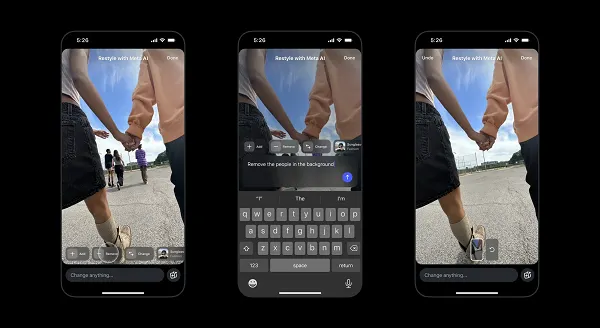
So again, it’s designed less as an AI prompt that generates entire images or videos for you, and more as an editing tool to customize your own uploads, using AI as a tool within your process (rather than it being the entire process itself).
“Experiment with your fashion by using preset effects like ‘sunglasses’, ‘biker jacket’ or even ‘black clothes’ to transform your outfits. Or you can change the entire style of the image itself so that it resembles a watercolor or film noir. Better yet, use these presets as a starting point to spark creativity. You can apply any effect and then type any additional changes you want to make to edit your content in seconds.”
It could be a useful addition, making it more interesting to share your own updates, without also adding to the flood of AI slop slowly taking over social media feeds.
The problem with AI slop is that it’s confusing and people hesitate to share content they’re unsure of for fear of being criticized because they now realize it’s AI.
But research also shows that more and more people are doing so raise concerns about AIand its consequences for the environment, but also because it is simply too fake and unfair. That has even prompted some brands to do so avoid technology in their marketingand more broadly, the influx of generative AI imagery has turned it off for many users, who now zoom in on every detail to find the cracks at the seams of these creations.
The best way to use the latest AI tools, in all contexts, is as a supporting element. As a complement to human work, AI tools can increase efficiency and increase opportunities, but they generally should not be the alternative solution to tasks normally performed by humans.
That also applies to creative work, and while some AI creatives may look great, I’d argue that it’s the knowledge and skills of the creator that produce great, resonant work, AI-enabled or not.
As such, these tools can be useful in increasing creativity, through simplified image editing controls built into the IG process.
In addition, you can also use preset effects for your images.
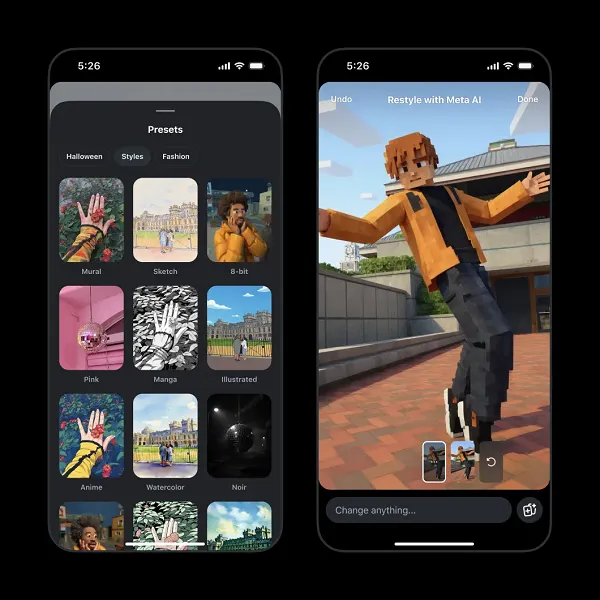
While you use the ‘Add Yours’ sticker on your AI-enhanced photos and videos, others can use the same settings.
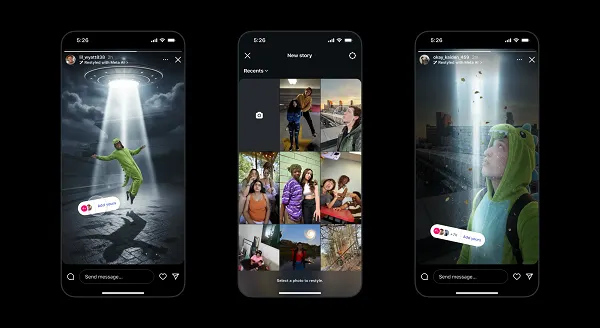
That could help spark new trends with the best of these AI-powered creations.
Instagram also provided some tips on how to create effective AI prompts to help you with your process:
- Subject (such as “place a crown on the girl’s head”)
- Lighting and mood (such as “Add dramatic lighting”, “Have light from just a single paparazzi flash”)
- Composition needs (such as “in the bottom left corner”, “in the background”)
- Style (such as “make photorealistic”, “film noir style”)
- Location (“in space”, “in Paris”)
So more specific language and guidance for the AI bots, which will then give you better results, while also allowing you to further integrate your own creativity by bringing your vision to life.
You can use Instagram’s updated Restyle option by by selecting an image from your camera roll to add to your story and then selecting the “Restyle” icon in the top box (as shown in the first example above).
#Instagram #adds #assistive #visual #creation