

You open Twitch, watch your favorite streamer and the ‘Claim Bonus’ button appears. You click on it, but instead of adding points or drops, it becomes one “Error when claiming bonus” message appears. Nothing happens.
This issue may prevent you from collecting Channel Points, Twitch Drops, or other viewer rewards. Don’t worry: this guide explains what the error means, what its most common causes are, how to fix it, and some ways to prevent it from happening again.
What is the “Error Claim Bonus” on Twitch?
A ‘Bonus Claim Error’ message will appear when Twitch’s system is unable to process your reward claim. It means that your request reached the Twitch servers but could not be completed.
When you click ‘Claim Bonus’, Twitch will check your account session, reward availability, and connection. If any step fails (perhaps your session has expired, your network has gone down, or the reward has already disappeared) the system will stop and display the error.
This issue can occur during claiming Channel points, Twitch dropsor community rewards from streamers. It’s usually not serious, but can be annoying if you miss out on temporary bonuses.
Common causes of the error
This error could be due to simple browser issues or Twitch’s own servers. These are the most common reasons you might see this:
- Weak or unstable internet connection – Twitch cannot verify your bonus claim if packs drop mid-request.
- Expired login session – You’re still using Twitch, but your token has expired in the background.
- Cache or cookie conflict – Old data stored in your browser will stop the new claim request.
- VPN or proxy use – Twitch may block or confuse traffic coming from modified regions or masked IPs.
- Reward limit reached – The bonus or drop you are trying to claim may already have been fully redeemed.
- Backend or API problem – Twitch’s rewards system or servers may be temporarily unavailable.
- Interference by browser extensions – Ad blockers or script blockers prevent the button script from running.
How to fix the “Error Claim Bonus”.
Solutions depend on the cause of the problem. Try these one by one until your bonus claim has been processed.
Solution 1: Check your Internet connection
A slow or unstable network can interrupt Twitch’s request to its servers.
These are the steps you can follow:
- Run an internet speed test: Twitch requires a stable connection to process claims.
- Restart your router or modem.
- Switch from Wi-Fi to Ethernet or try a different network, such as mobile data.
- Reload the stream and click on the bonus again.
Solution #2: Log out and log back in
Sometimes your Twitch session goes silent. Logging out resets it.
Go to your profile icon, choose Log outand then log in again. After you log in, reload the stream. Many users find that this resolves the error immediately as it forces Twitch to generate a new authentication token.
Solution 3: Clear browser cache and cookies
Old cache or cookies can cause Twitch to send bad requests.
Steps:
- In your browser, open Settings → Privacy → Clear browsing data.
- Select Cookies And Cached files.
- Restart the browser and visit twitch.tv again.
- Try to claim the bonus again.
If you’re using the mobile app, clear the app’s cache or reinstall Twitch to refresh the saved data.
Solution 4: Disable VPNs, Proxies, or Browser Extensions
VPNs, proxies, or browser add-ons can disconnect Twitch from its backend servers. Disable your VPN or proxy and refresh Twitch.
If you are using an ad blocker or privacy extension, temporarily disable it. Some of these block the JavaScript that Twitch uses to deliver rewards. Once the error goes away, you can whitelist Twitch to keep extensions enabled without blocking their scripts.
Solution #5: Check account and bonus availability
Sometimes the reward is no longer active or your account is not eligible.
- Make sure you are logged into the correct Twitch account.
- Check the reward description; some have limited supplies or time.
- If it’s a Twitch Drop, make sure the linked game account (such as Steam or Ubisoft) is still connected.
If the bonus has expired or has run out, you will have to wait for the next event.
Fix #6: Check Twitch status or wait for server recovery
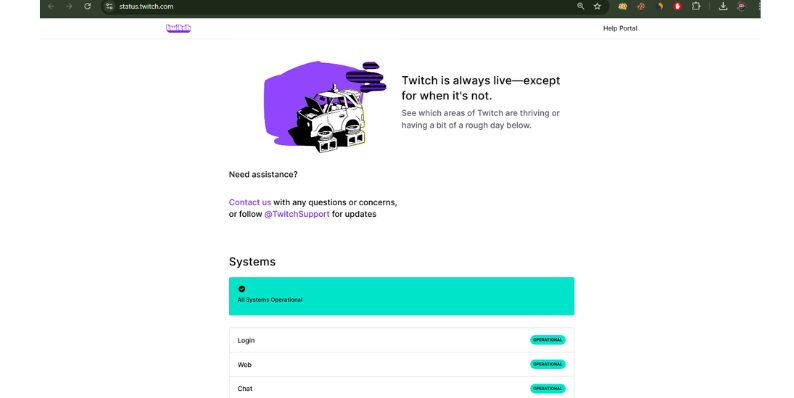
If everything seems fine on your end, Twitch’s servers could be the problem.
Visit status.twitch.tv or community sites such as Down detector. If many users report ‘Error Claiming Bonus’, the problem lies with Twitch. In that case, all you have to do is wait for the backend to recover. Most Twitch server issues are resolved within a few hours.
Prevention tips to prevent muscle pain in the future
You can avoid seeing this message again by keeping it uncluttered and clear.
- Keep the Twitch app or browser updated.
- Avoid using VPNs or proxies while watching streams.
- Clear the cache and cookies once a week.
- Check your internet before participating in long streams or events.
- Don’t run heavy browser extensions during Twitch streams.
- For streamers, set reward limits carefully and test redemptions before going live.
These steps will help Twitch run smoothly and avoid mistakes when claiming bonuses.
Conclusion
The “Error when claiming bonus” on Twitch appears when the platform cannot process your reward claim. It is often caused by weak connections, expired sessions, or temporary server issues.
You can resolve the issue by refreshing Twitch, clearing the cache, disabling VPNs, or checking the Twitch status page. If the problem persists, it’s likely Twitch’s end and you’ll have to wait for the service to be restored.
Once this is resolved, you can continue collecting your channel points and rewards without any interruptions. Share this guide with other Twitch viewers so they can fix the problem too.

Where should we steer?
Your WordPress deals and discounts?
Subscribe to our newsletter and receive your first deal straight to your email inbox.
#fix #Error #claiming #bonus #Twitch #Short #manual