

Advanced Custom Fields 6.6 is here, offering a powerful new way to build and edit custom blocks
Building custom blocks with advanced custom fields has always been about giving developers powerful tools while keeping the content editing experience simple and intuitive. With the just released Advanced Custom Fields version 6.6that promise becomes even better.
The headline feature is ACF Blocks V3: a powerful evolution of how developers build custom blocks and how content teams use them. This isn’t just an incremental update; it’s a foundation for next-generation ACF block development that will benefit everyone involved in creating and managing WordPress sites.
Why ACF Blocks V3 Matters
For years, editing an ACF block meant that the preview would disappear and be replaced by an inline form. You would make your changes without seeing how they fit on the page around them. It worked, but it wasn’t ideal, especially as blocks became more complex with nested fields, repeaters, and galleries.
ACF Blocks V3 for ACF PRO solves this. Block fields now open in a spacious sidebar panel, while the block preview remains visible in the editor. Content editors can see their changes in context and have the space to work with even the most advanced field configurations.
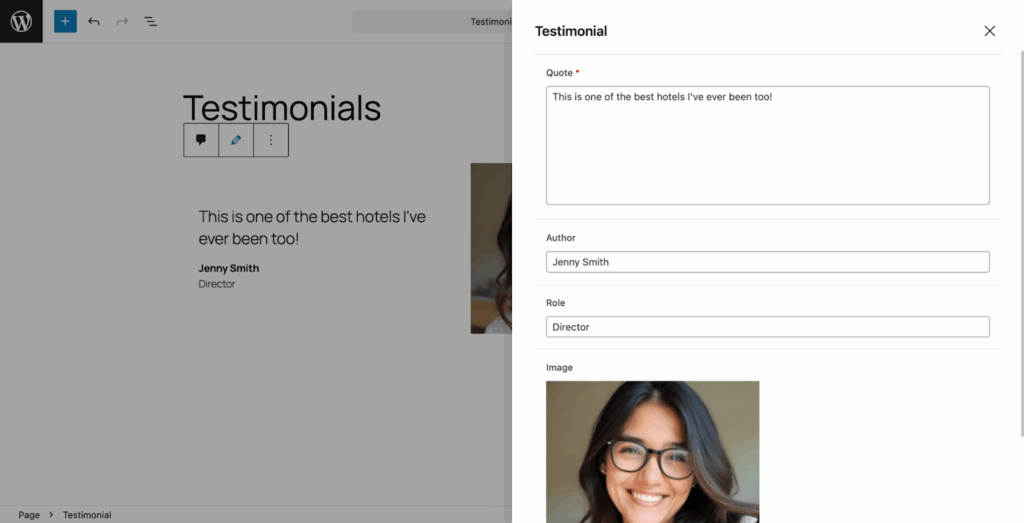
For agencies and development teams, this means happier customers who find the editing experience more intuitive. For content teams, this means less guesswork and more confidence that what they’re building will look good on the page.
Built for how WordPress works today (and tomorrow).
ACF Blocks V3 lays the technical foundation for upcoming features such as inline editing, where you can edit block content directly within the preview itself. This is the kind of modern, polished editing experience that makes managing WordPress sites a pleasure.
The new architecture takes full advantage of WordPress’s modern block rendering system, ensuring your blocks work reliably across themes and editing contexts. As WordPress continues to evolve, ACF Blocks V3 positions your custom blocks so they can be resized seamlessly.
Upgrade on your timeline
We know that change can be disruptive, especially when you’ve built dozens of custom blocks that customers depend on every day. That’s why ACF Blocks V3 is fully opt-in at the block level.
Your existing blocks will continue to work exactly as they do now. There’s no rush, no major changes, no emergency updates required. You can strategically upgrade blocks (perhaps starting with new projects or blocks that would benefit most from the expanded sidebar space) and roll out the new experience at a pace that works for your team and your customers.
That said, we encourage developers to plan their migration to V3. The WordPress core is moving towards requiring iframe-based blocks in future versions, and V3 will ensure your blocks are ready. Most importantly, upgrading gives access to the modern editing features and the upcoming inline editing capabilities that will define the next generation of WordPress content management.
More improvements to streamline your workflow
In addition to the blocks revolution, ACF 6.6 delivers two other major updates that improve the usability of ACF for both developers and content teams.
Clearer field groups with display titles
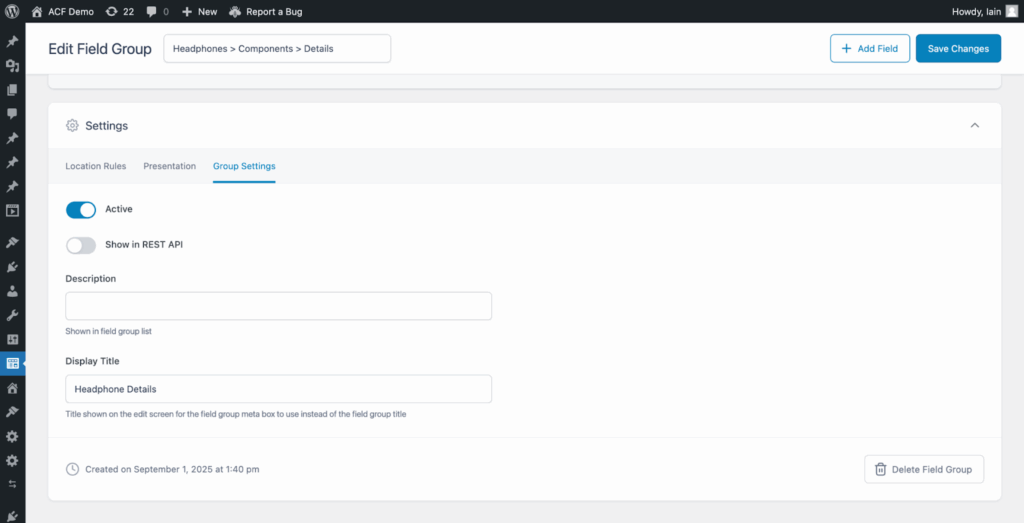
Have you ever created a field group with a name that made sense to you, but confused your customers? With ACF 6.6 you can now set individual display titles for field groups. This new title is what your content authors will see when they edit a post or page, providing a more user-friendly label without changing the underlying field group name you use for development. No more field groups named “Homepage_Hero_Settings_v2” confusing your customers; instead they see the “Homepage Banner”.
Custom color palettes for a consistent brand
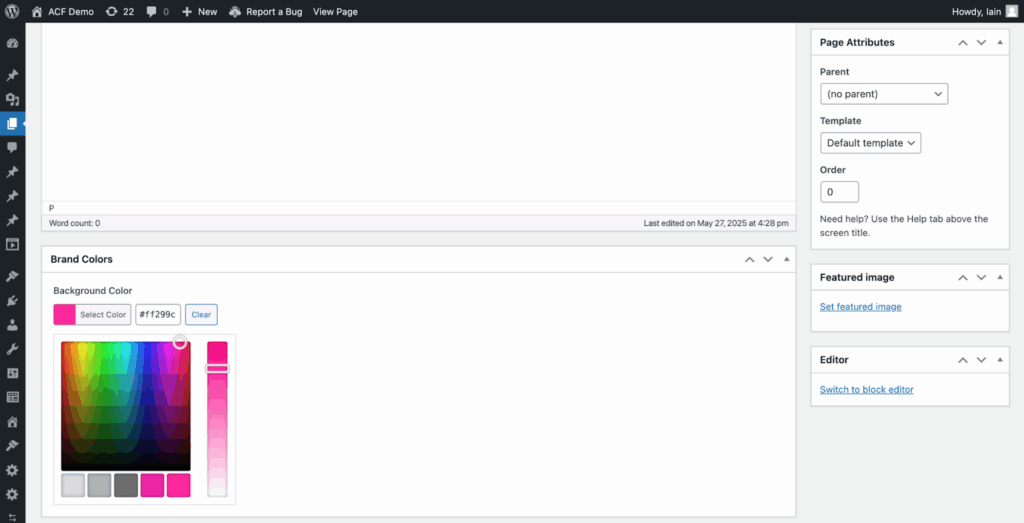
The Color Picker field now offers more flexibility and control. You can define a custom color palette using a comma-separated list of hexadecimal codes so that content authors use only brand-approved colors. You can also disable the color wheel completely so that users can only use the colors in your palette.
These updates streamline workflows by saving training time, reducing confusion, and improving coordination.
Why this is important for modern WordPress development
At WP Engine, we see thousands of sites built with ACF – from traditional WordPress installations to advanced headless applications on our Headless WordPress platform. What’s striking is how ACF has become fundamental to building advanced, content-rich WordPress experiences.
ACF 6.6 strengthens that position. It shows a commitment to evolving alongside WordPress itself and ensuring that the tools you rely on today will be even more powerful tomorrow. Whether you’re building client sites, managing enterprise content, or pushing the boundaries of what’s possible with WordPress, ACF remains the reliable foundation you can build on.
Get started with ACF 6.6
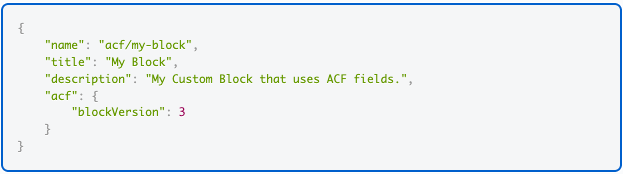
To start using ACF Blocks V3, add “blockVersion”: 3 to the “acf” object in your block’s block.json file. The full release notes provide full technical details and migration guidance.
Please note that ACF 6.6 requires WordPress 6.2 or later, which was necessary to support the modern capabilities that enable these new features.
Connect with the ACF community
Want to dive deeper into what’s possible with ACF and connect with developers building incredible WordPress experiences? Join our Builders community for events, resources, and conversations with other WordPress pros who are as passionate about great development as you are.
ACF 6.6 represents an exciting step forward: one that makes building with WordPress more powerful, more fun, and more in line with where the platform is going. We can’t wait to see what you build with it.
#ACF #Blocks #Giant #Leap #Custom #Block #Development #engine