

Imagine if your visitors could simply click on a few options in the search filter, such as ‘Price: Low to High’, ‘Rating: 4 Stars’ or ‘Color: Blue’… and the perfect results immediately appear.
Unfortunately, most filtering tools on the market are frustratingly complicated, require hiring a developer to set up, or are strictly limited to WooCommerce stores.
It simply shouldn’t be that difficult to help your visitors find the content they’re looking for.
That’s why today I’m excited to share the launch of WPFiltersa groundbreaking plugin that makes adding “Amazon-style” faceted search to WordPress completely seamless.
We developed this tool to help you avoid losing visitors who can’t find what they’re looking for. Whether you have a blog, an ecommerce store, or a directory, WPFilters allows your users to filter posts, products, and custom content by categories, tags, custom fields, and more.
Think of it as the ultimate navigation upgrade that turns your WordPress site into a professional, searchable database in minutes.
Backstory – Why WPFilters?
We took over a few years ago SearchWP to fix the broken default WordPress search. Today it helps more than 50,000 site owners show the right results to their audiences.
As the community grew, we quickly noticed a consistent pattern in feedback.
While the search bar now found the right content, our users wanted a way to help their site visitors narrow down those results.
For example, when a visitor searches for a broad term like “breakfast recipes” on a blog or “shoes” in a store, he or she may get hundreds of results. Users wrote to us asking, “How can I let my visitors filter these results and help them find what they’re looking for?”
Most filtering tools on the market expect you to hire a developer to make them work on your site. That’s when I realized that faceted search had become a “premium” feature, something that only large companies with big budgets could realistically offer.
That didn’t sit well with me. I believe that powerful website features should be accessible to everyone, not just those who can code.
So I sat down with the team and posed a challenge: let’s build a filtering solution that’s as powerful as Amazon’s, but as easy to use as the WordPress Block Editor.
That’s exactly what WPFilters delivers.
Here is the overview of WPFilters. Watch the video:
What is WPFilters?
WPFilters is a powerful WordPress filter plugin that allows you to create advanced search filters for your website without writing complex code.
In the developer world this is called ‘faceted search’. But for you and your visitors it simply means immediate clarity.
WPFilters lets you build custom filter sets based on categories, tags, or custom data, and place them anywhere on your site. This allows your visitors to browse your content and find exactly what they need in seconds.
Instead of scrolling through pages of irrelevant results, they can simply check a box for “Category,” slide a bar for “Price,” and so on.
Whether you use the standard WordPress search or the powerful SearchWP engine, WPFilters creates the frontend interface that makes browsing your site a pleasure.
This is what makes it special:
1. Create “Amazon-style” filters with multiple input types
If you look at major sites like Amazon or Airbnb, you’ll notice how easy it is to use their filter options to discover the right results.
They use radio buttons for single-choice selections, checkboxes for multiple-choice selections, and visual sliders for price ranges.
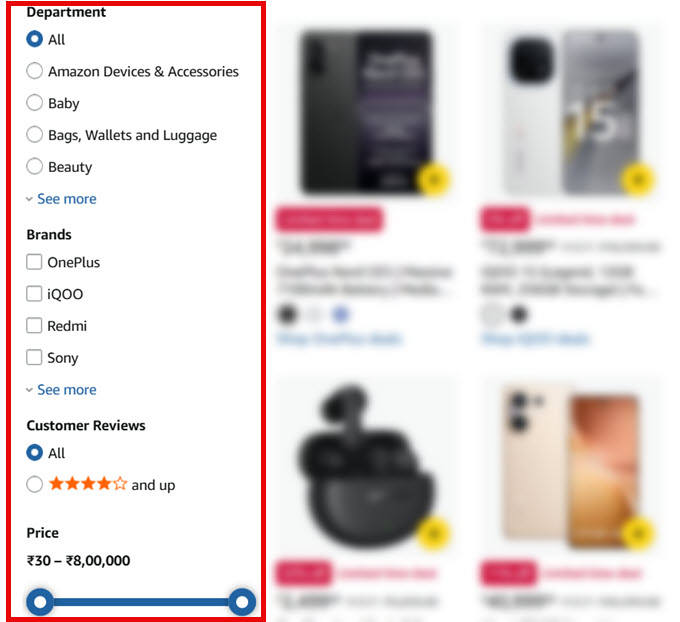
This is exactly the experience that WPFilters brings to your site. You can assign the perfect input control to suit your data, making your site feel like a professional, custom-coded app.
For publishers and blog owners, this goes far beyond what standard categories can do. For example, you can allow your visitors to combine criteria, such as finding a ‘Vegan’ recipe that is also ‘Under 30 minutes’ and has a ‘5-star rating’.
This kind of detailed overview helps your readers find exactly what they’re looking for right away, keeping them on your site longer.
WPFilters comes with a wide variety of input types to meet different needs:
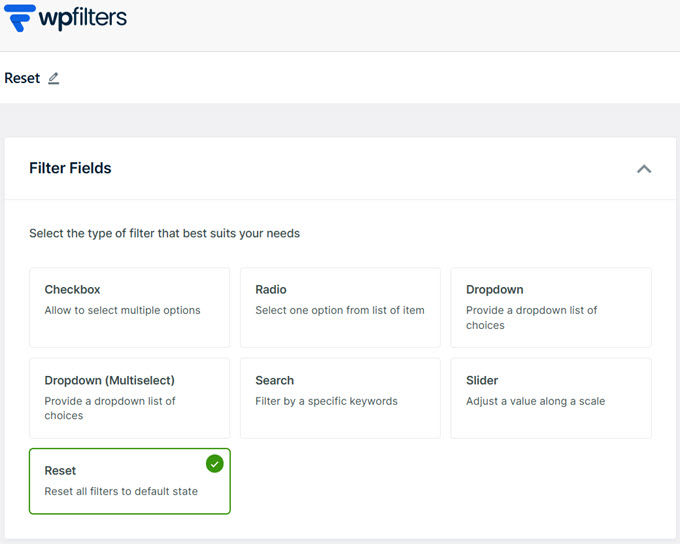
- Checkboxes: lets users select multiple options at once (great for categories or tags).
- Radio buttons: ideal if you want users to make one exclusive choice.
- Drop-down lists (single and multiple selection): save screen space and provide powerful sorting options.
- Range sliders: a visual way to filter numerical data such as price, weight or size.
- Search bar: allows users to filter the results list by specific keywords.
- Reset button: a way that allows users to clear all filters and start over with one click.
Filter on everything: categories, tags, custom fields and more
Your WordPress site is full of valuable data, but most of it is hidden from your visitors. Normally you can only link to a generic category archive, and that’s it. If you want to let users filter by something specific, like an author or a custom field, you’re usually out of luck.
WPFilters unlocks all that data and turns it into clickable filters. You are not limited to just standard categories; if the data exists in WordPress, you can filter on it.
This includes standard categories, tags, or a custom taxonomy (such as product categories, genres, and more).
If you use advanced custom fields to store additional details, WPFilters will automatically detect these fields and let you use them as filters immediately.
Display filters anywhere with flexible embedding options
Every WordPress site is built differently. Some of you like the modern Block Editor, while others prefer page builders like SeedProd or Divi. We built WPFilters to fit seamlessly into your existing workflow, no matter how your site is set up.
Once you’ve configured your filters, you have complete freedom over where you want to display them. If you are using the WordPress Block Editor (Gutenberg), simply search for the WPFilters elements block and drop it somewhere on your page. It integrates natively with the editor settings.
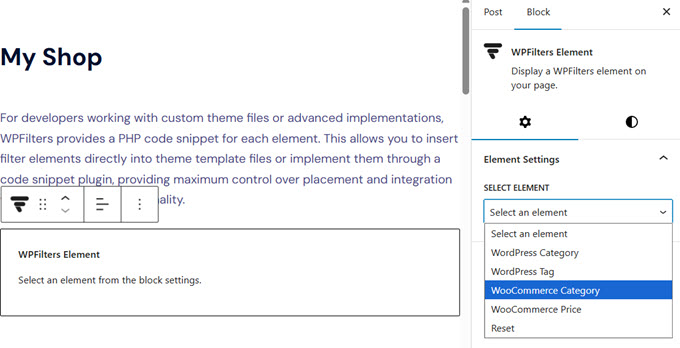
Alternatively, If you use page builders such as SeedProd, or if you want to use the Classic Editor, you can use the unique shortcode provided for each filter. Just copy and paste it where you want to embed it.
If you’re a developer, WPFilters also gives you access to a ready-made PHP snippet, so you can code filters directly into your template files.
Smart control over user experience (UX)
If a filter list is too long or shows options that yield no results, it can actually frustrate your visitors. WPFilters comes with several smart controls to keep your filters looking clean and professional.
You have full control over the behavior and layout of your filter elements:
- Foldable sections: If you have long lists of filters, you can make the sections collapsible. This saves valuable screen space, especially on mobile devices.
- Number of articles: Automatically display the number of results next to each filter option (for example, “Marketing (12)”) so users know exactly how many posts there are before they click.
- Hide empty options: You can choose to hide options that return zero results. This prevents the annoying experience of a user clicking on a category and then seeing a “No results found” message.
- ‘View more’ links: Keep your sidebars clutter-free by showing only the first few options and hiding the rest behind a “Show More” link.
- Horizontal Layouts: Instead of a standard vertical list, you can display checkboxes or buttons side by side, which is perfect for top bar filters.
Built by the team behind SearchWP
WPFilters was built by the same team behind it SearchWPthe leading search plugin trusted by thousands of WordPress website owners.
SearchWP has been the gold standard for determining the search relevance of WordPress (the backend) for years. We helped you ensure that when a user searches for “blue shoes,” they actually find blue shoes.
But we realized that finding the right results is only half the battle. It’s just as important to present them in a way that’s easy to browse.
That’s why we built WPFilters.
We wanted to bring the same level of code quality and reliability you expect from SearchWP to the frontend of your site. While WPFilters works beautifully with the standard WordPress search, it is designed to be the perfect complement to SearchWP.
Together they give you a complete enterprise-grade search experience, improving both relevance and usability, without the need for expensive SaaS subscriptions or custom development.
What comes next?
This launch is just the beginning.
We’re really building something special here and we want you to be part of it. Our goal is to create WPFilters the best filtering solution for WordPress, and the best way to do that is by listening to you.
We have an exciting roadmap ahead, but we want to make sure we build exactly what you need. If you have ideas for new filter types, integrations or features that would make your life easier, please contact us send us your suggestions.
We are listening and look forward to continuing to serve you for years to come.
Yours sincerely,
Syed Balkhi
Founder of WPBeginner
#Introducing #WPFilters #Advanced #Search #Filters #WordPress