

However, the prospect of migrating an existing website can raise legitimate concerns about compatibility, site uptime, and a new way of doing things. This guide addresses these concerns by providing an overview of the Divi 5 migration process, the backward compatibility system, and best practices for a smooth transition.
What the migration process does
The migration and backward compatibility system was a huge undertaking. Other page builders in recent history haven’t tried to build something similar for their loyal customers. However, we have invested a significant amount of development time to ensure that your website can take full advantage of our best product yet. Therefore, many things happen with this process.
Subscribe to our YouTube channel
Download the Divi 5 beta
First, an extensive check is performed on all your Divi content. This check measures the compatibility of every single module on your site with Divi 5. You should love this because it tells you exactly what to expect before you click Migrate.
The Compatibility Checker shows unsupported modules. For this site, I know that Divi 5 has a native Grid system and can easily handle two side-by-side buttons so I can recreate them all in Divi 5. I’m that much closer to a fully Divi 5 site!
When you choose to migrate, all fully supported assets/modules will be converted from Divi 4 shortcode format to Divi 5 serialized format. This conversion preserves all design settings, content, and configurations, so the appearance and functionality of the frontend remains unchanged.
Modules not yet fully supported by Divi 5 Beta, such as some third-party modules on the Divi Marketplace, are packaged in the Divi 4 framework for “backward compatibility.” This means they will continue to function with the old shortcode system, so no content or functionality is lost even with Divi 5 installed.
If a page contains a module that requires the Divi 4 framework, the entire page will load that framework. Mixed content pages will not benefit from the full performance improvements of Divi 5 until all modules are converted. Pages can be updated by removing these incompatible modules or by waiting for the appropriate third-party developer to update the extension for Divi 5.
Preparing for migration
Testing the migration in a test environment first is the safest approach. This allows you to identify potential problems without compromising your live site. Most hosting providers offer test environments, or you can use plugins to create a local copy. Run the migration on staging, verify that everything is functioning correctly, and if everything goes well, you can push the staging site to production.
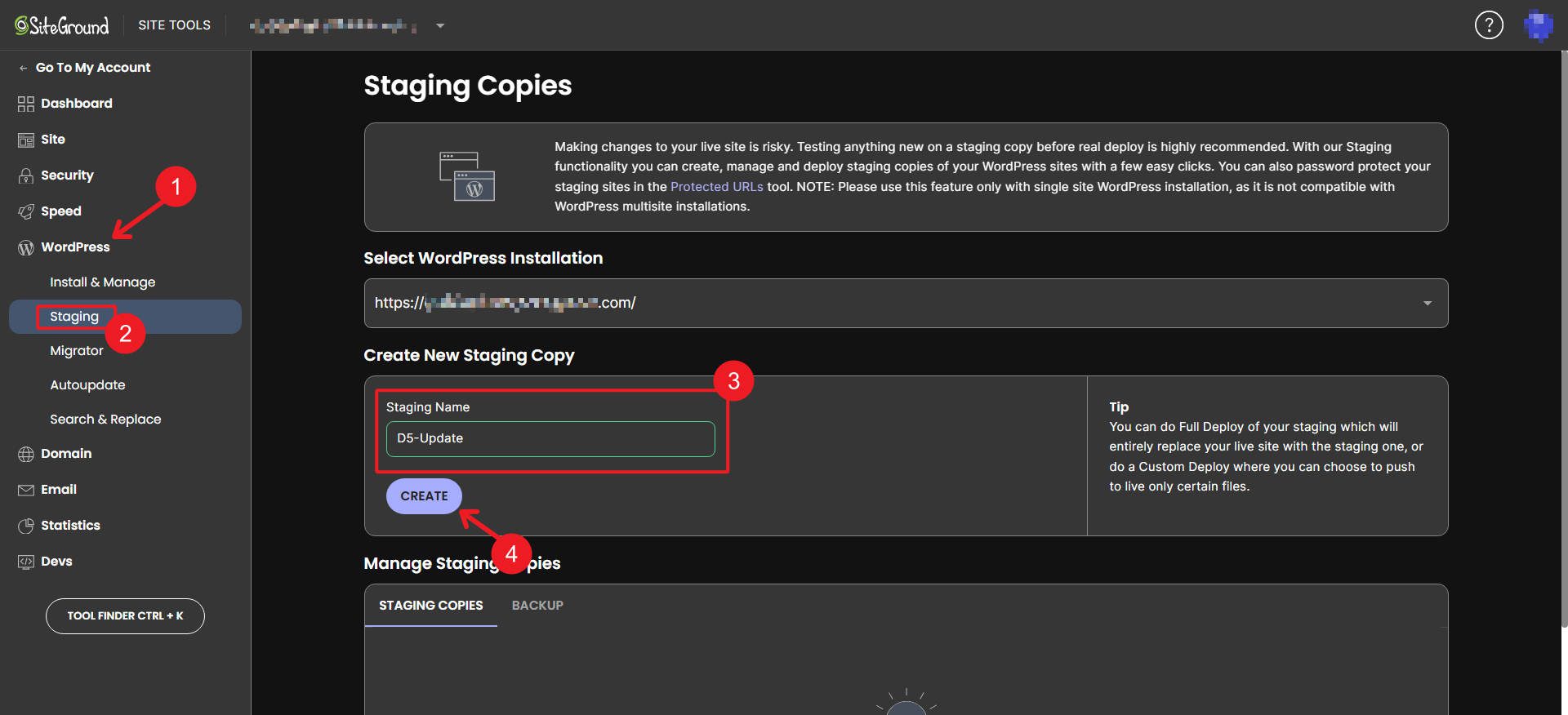
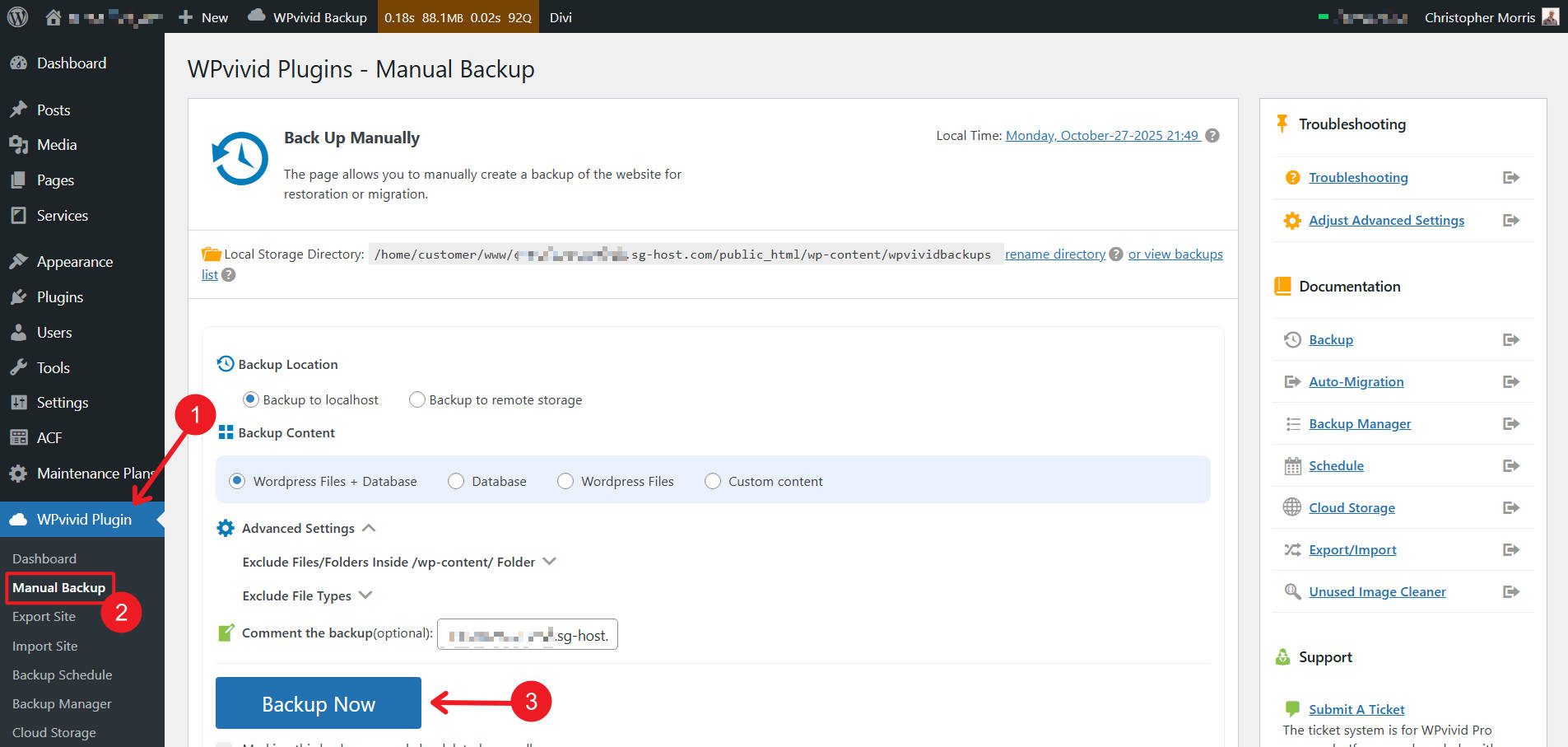
Before going live, make a full backup of your original Divi 4 site using a reliable backup solution. Add the database, upload directory, and all theme and plugin files. If you experience any issues during or after the migration, a backup can help you restore your site to its pre-migration state without data loss. While Divi 5 Beta is stable enough for production use, backups provide essential insurance against unexpected migration issues.
Make sure all plugins and extensions are updated to the latest versions. If you are using a child theme with custom PHP, check the code for any dependencies on Divi 4 specific APIs. Many things will need to be tested. So test regularly until you are comfortable implementing the change.
Make a list of any third-party modules or extensions you use. Check with the developers to see if they have released or are about to release Divi 5 compatible versions.
How to use the Divi 5 migrator
Currently, there is no “Migrate to Divi 5” option on your Divi 4 website. To start that process, go to your member account dashboard and download the latest Divi 5 version. From there, go to your WordPress dashboard (on your test site) and upload the theme (as if you were installing a new theme).
Download the Divi 5 beta
Once you have installed Divi 5, navigate to your WordPress Dashboard and locate the Divi menu. You will see a new option labeled Divi 5 Migrator. Click this to access the migration interface. Your first compatibility check will automatically start.
Understanding the Compatibility Report
The Divi 5 Migrator system performs a comprehensive scan of your entire website before the migration begins. It controls nine different areas: pages, posts, custom post types, theme builder templates, WooCommerce products, Divi library items, widgets, and presets.
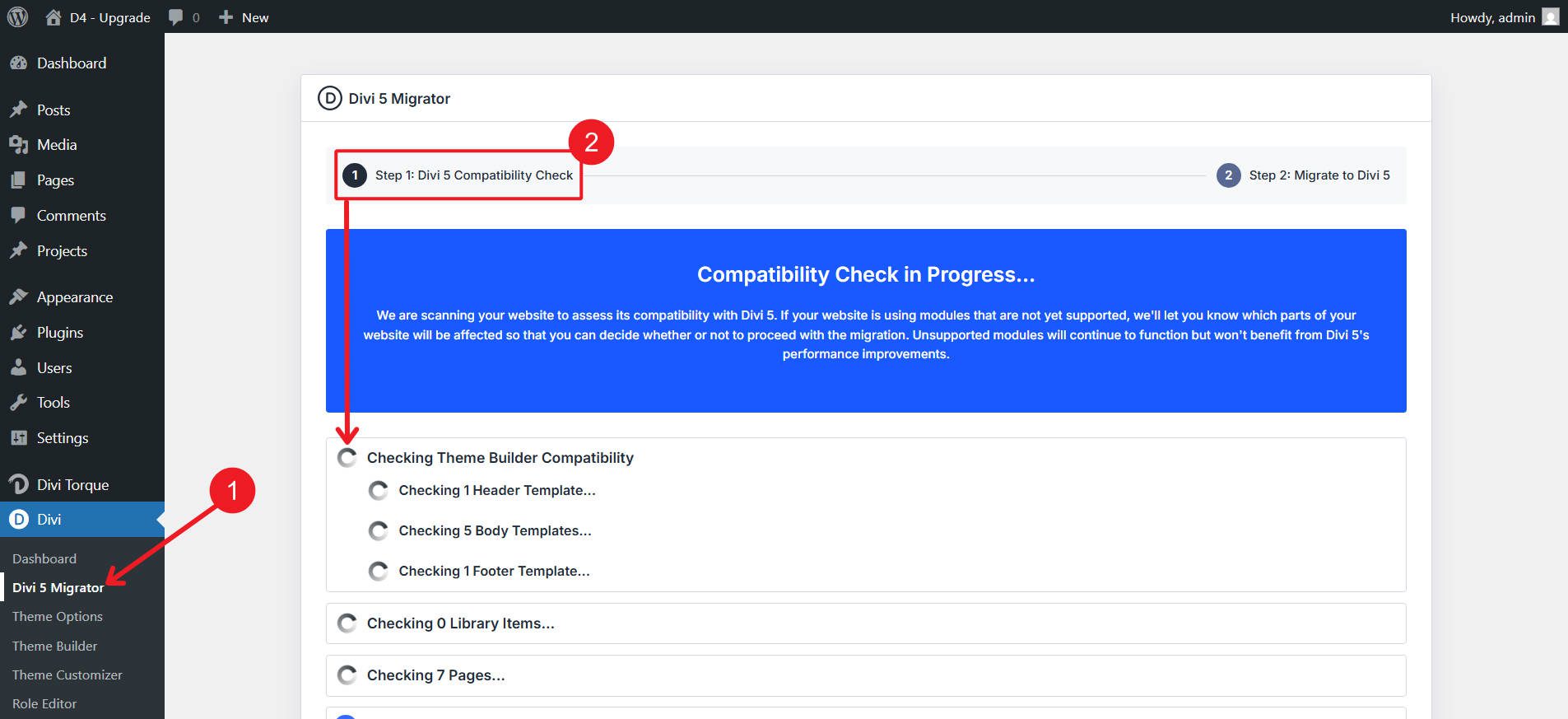
For each area, the migrator identifies which elements are fully compatible with Divi 5 Beta and which contain modules or features that are not yet fully supported. Blue check marks indicate items that are ready to be migrated and will function natively in Divi 5 Beta without backward compatibility mode.
Orange warning icons indicate items that contain unsupported modules or features. These items will be migrated, but the unsupported components will run in backward compatibility mode using the Divi 4 framework.
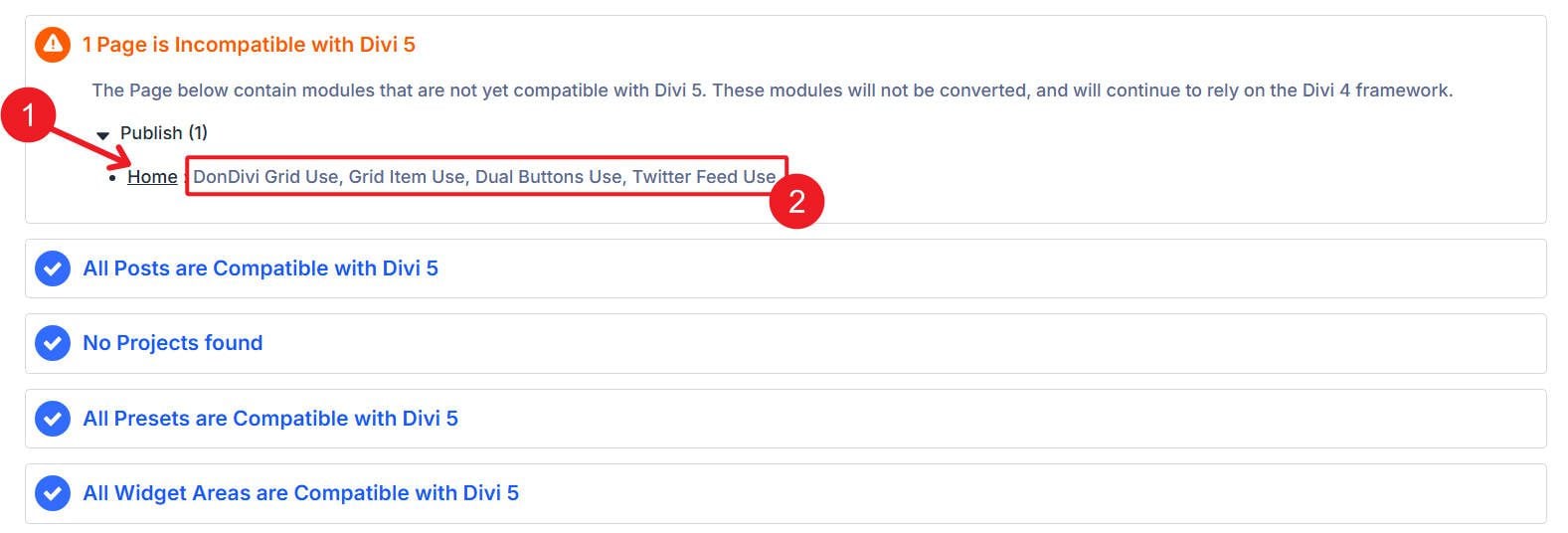
You should see where the incompatibility is (e.g. page, theme builder template) and which module/element is causing it.
Please read this report carefully. It provides transparency into what will and won’t immediately benefit from Divi 5’s performance improvements. For items marked with warnings, pay attention to which specific modules are causing the compatibility issue. This information will help you plan future updates when module developers release Divi 5 compatible versions.
Initiating the migration process
After reviewing the compatibility report, you are ready to begin the migration. The migration interface presents a primary action button labeled “Migrate this site to Divi 5 Beta.”
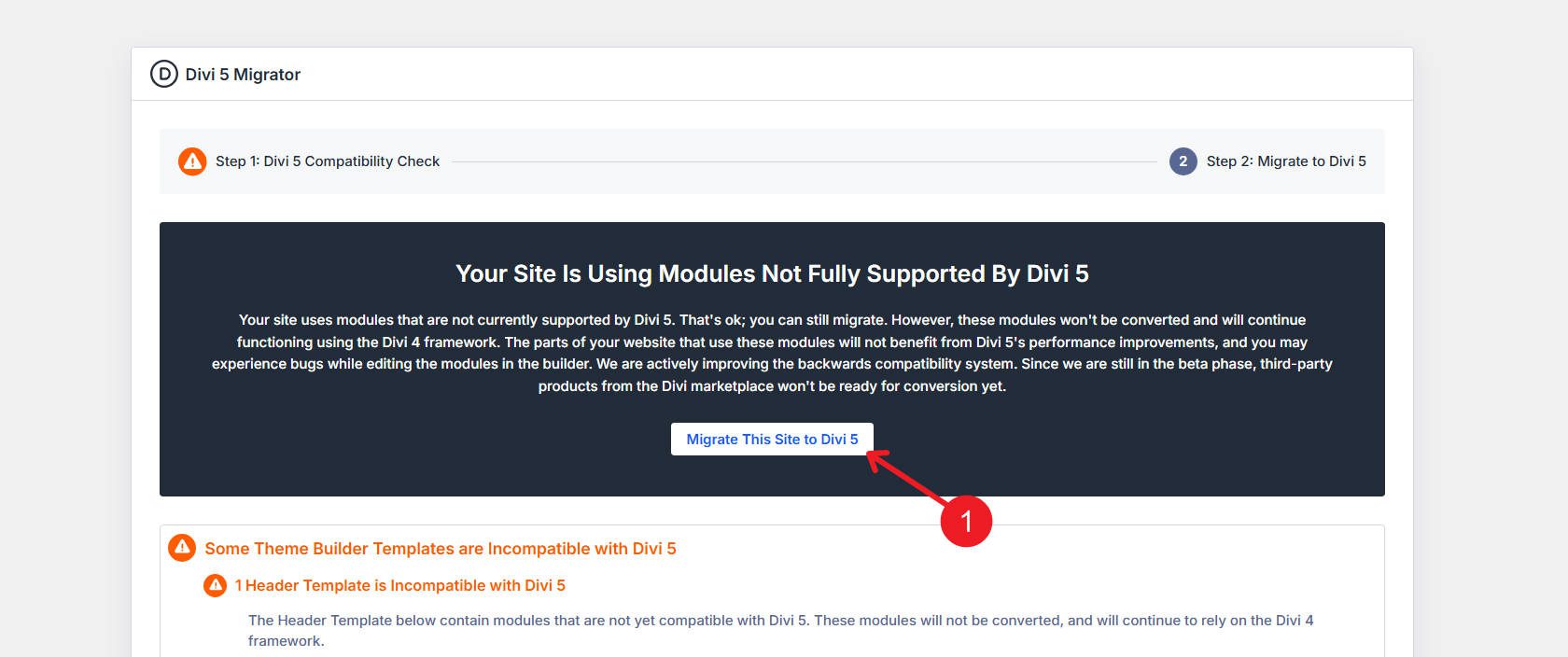
You can migrate even if not everything is fully compatible. That’s the beauty of backwards compatibility!
Click To confirm continue.
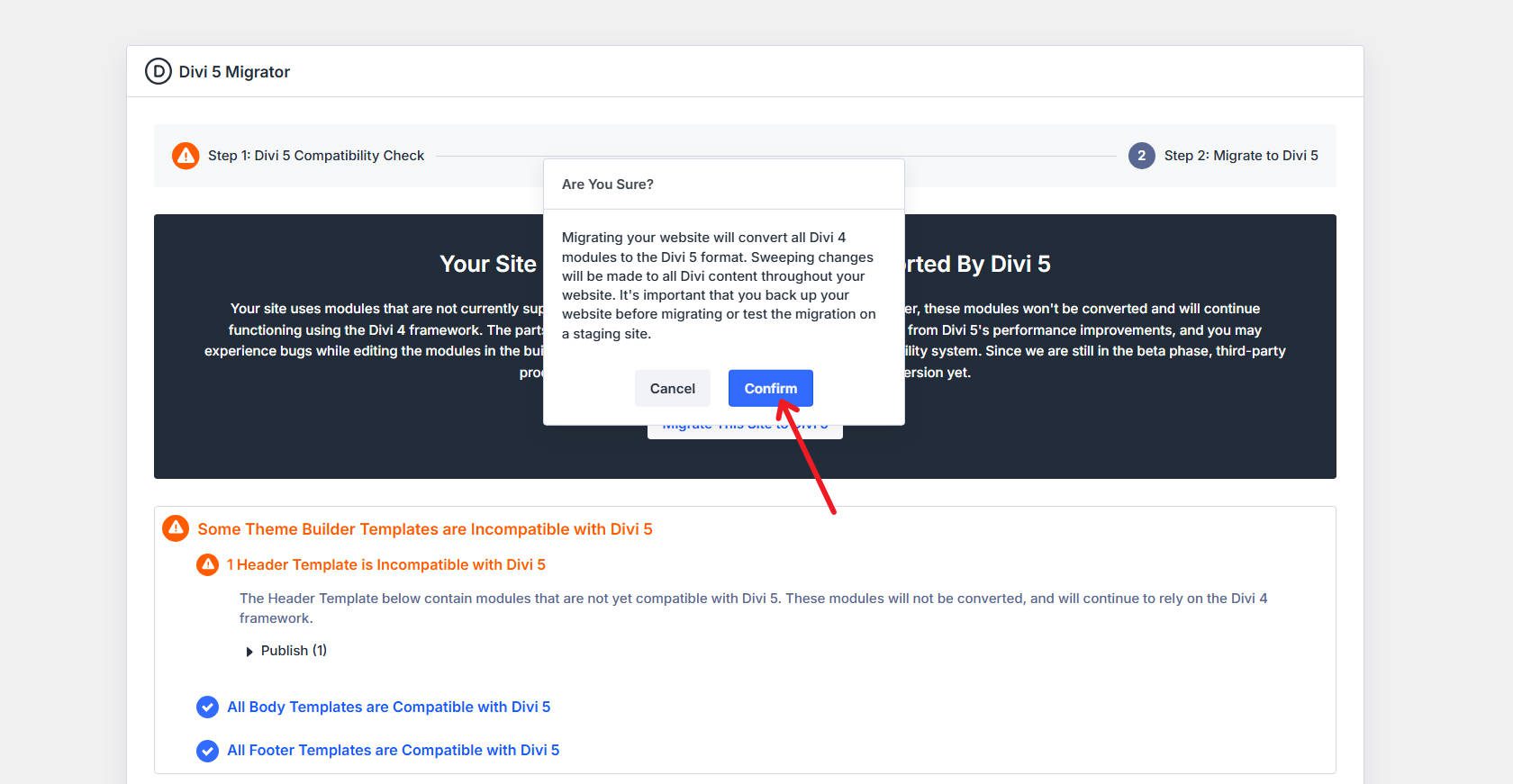
For smaller sites, the migration process is typically completed within seconds. For larger sites with extensive content it may take one to two minutes. During this time, the system processes every Divi-built page, post, and template, converts supported modules, and packages unsupported modules.
Once the migration is complete, you will see a ‘Welcome to Divi 5’ card. You may also see two buttons. One of them is if you still have modules that are not yet compatible. This button allows you to check compatibility while your extensions are updated. If your site didn’t handle the migration properly, we provide a button to restore everything to Divi 4. Your backup may be preferred, but this is a courtesy to help you in an emergency.
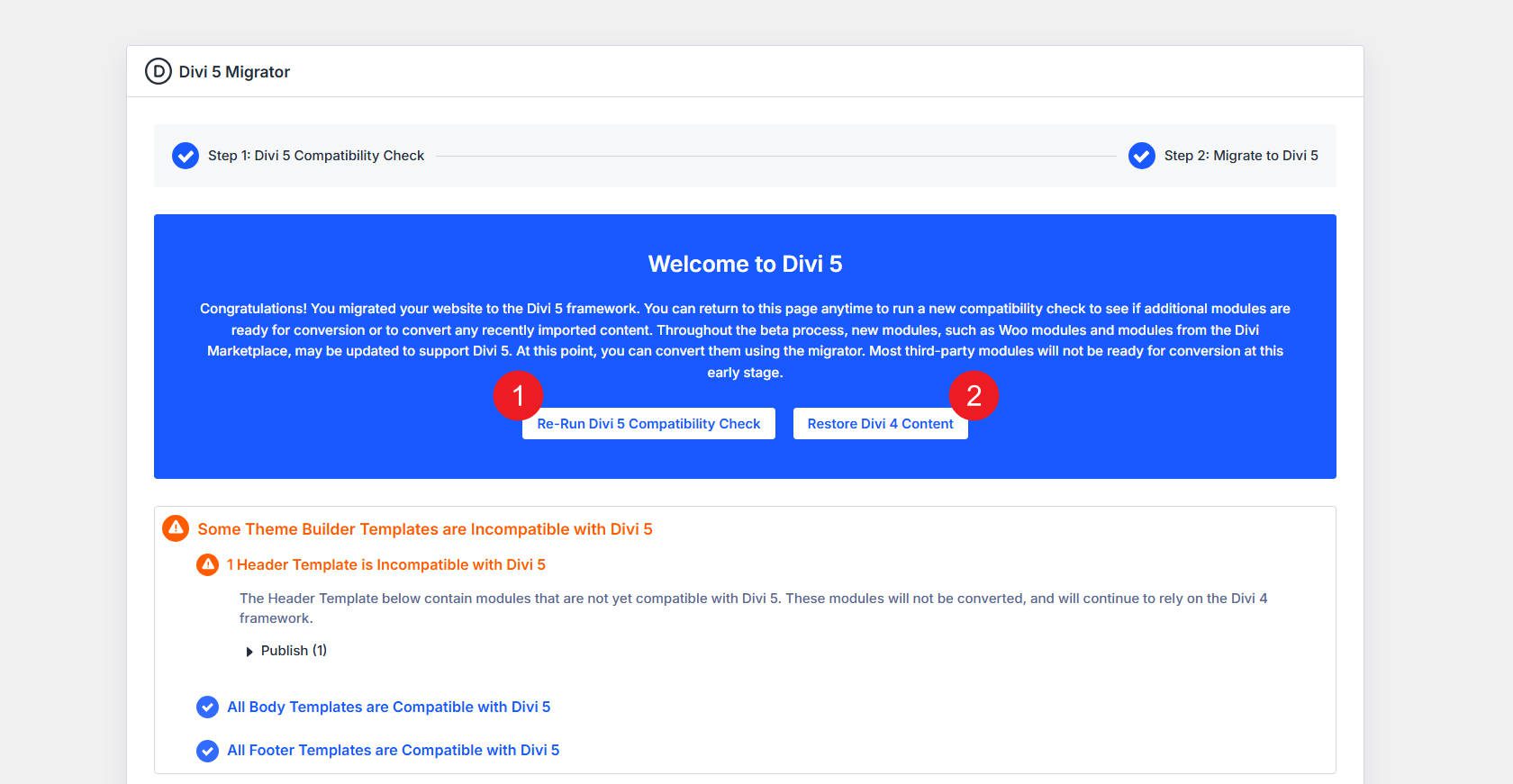
If you need to recover, we recommend that you try this process again in about a month. We’re working on an incredible number of bug fixes, and numerous Divi extensions are in the works to become compatible with Divi 5.
What happens if your site loads in backward compatibility mode?
Backwards compatibility mode is the safety net that ensures no content or functionality is lost during your move to Divi 5. That means you can run Divi 5 on compatible pages, but have to give some third-party extensions time to catch up. It’s a best-of-both-worlds scenario that we came up with a long time ago.
If a page contains a module running in backward compatibility mode, you will see a warning message on the frontend of your website that says Backwards compatibility mode enabled. This message is informational and not an error. It simply indicates that the page is loading the Divi 4 framework to support older modules.

Pages in backward compatibility mode will not experience the full performance benefits of the new Divi 5 framework. They will function correctly and retain their appearance, but the underlying rendering system uses the older architecture. When editing modules in backward compatibility mode, certain advanced features introduced in Divi 5 may not be available for older modules, although all standard editing features remain intact.
The warning message will disappear once all modules on a page have been converted to Divi 5 native versions. This happens automatically when module developers release updates, and for most it will only be a matter of time.
When should you migrate to Divi 5?
The question is not so much whether you should migrate. Divi 5 is the future and the backwards compatibility system ensures you don’t break anything. The real question is about timing and preparation.
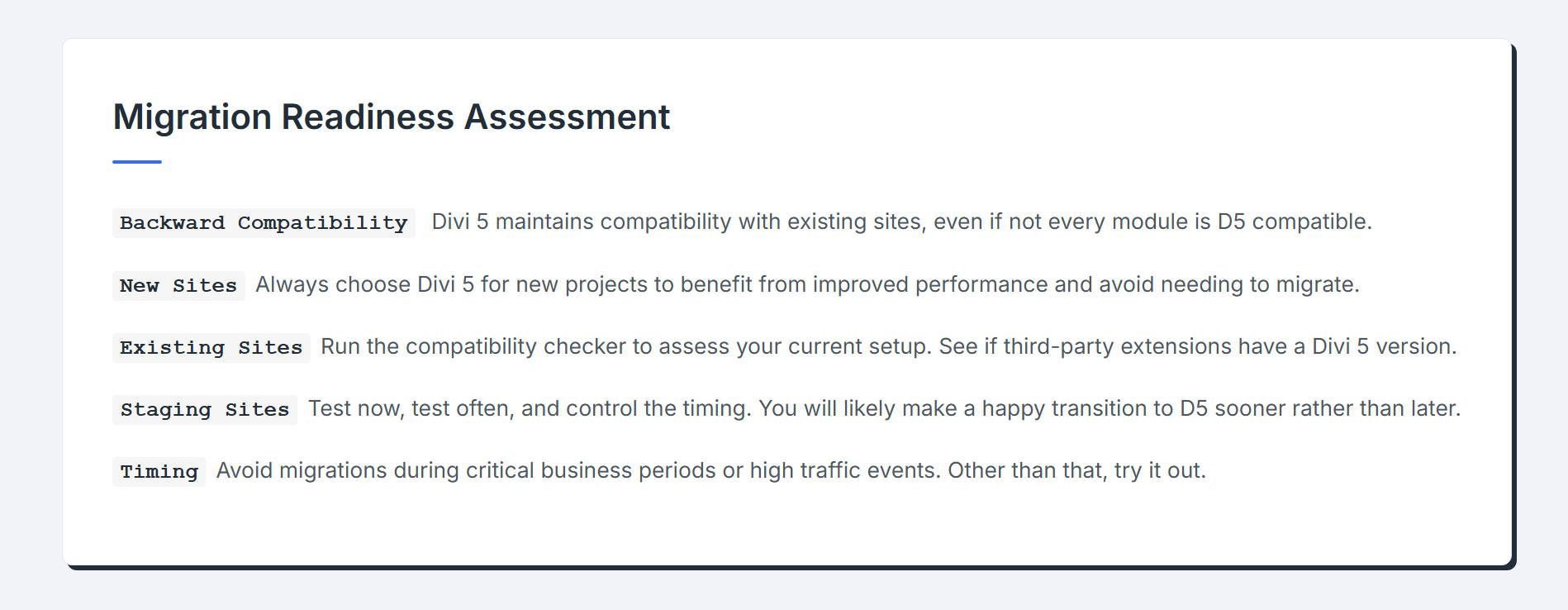
New sites are easy to create. If you’re starting from scratch, use Divi 5. It’s faster, the interface is better, and you get access to features that simply don’t exist in Divi 4. There’s no scenario where starting a new project on the old framework makes sense.
Existing sites require more attention, but probably less than you think. Most Divi sites are built with core modules, perhaps a few popular extensions, and standard customizations. The Compatibility Checker tells you exactly where you stand before you commit to anything. Run it, check out the report, and if you’re looking at mostly compatible modules with only a handful of third-party extensions highlighted, you’re in good shape.
Business timing also matters. If you’re in the middle of a product launch, a seasonal sales period, or an unusually high traffic volume, wait until things stabilize. Divi 5 is solid, but any significant change during peak periods introduces risks you don’t need.
Taking all this into account, the following is encouraging: the pace of development is currently intense. We are active open and work on bug reports. If you’re having trouble testing during migration testing today, please try again in a few weeks. Issues blocking you now will likely be completely resolved by then. Regular testing of the test site accelerates your path to production migration while minimizing risk.
Start your Divi 5 migration
Migrating to Divi 5 Beta positions your site for better performance, improved editing capabilities, and long-term compatibility with core WordPress development. The migration process is simple, the backward compatibility system ensures no content is lost, and the rollback function provides a safety net if unexpected problems arise.
Download the beta, create a test site, run the migration, and experience the next generation of Divi. The framework improvements, interface improvements, and expanded feature set make the transition more valuable than you can even expect.
#Migrate #Website #Divi #Public #Beta